Releases
The automated canary-to-main flow that versions the repo and drafts the changelog.
Two long-lived branches carry the project: canary for development and main for production. Day-to-day work squash-merges into canary; when you're ready to cut a release you review and merge a single pull request that opens itself, and the changelog, version bump, tag, and GitHub release all follow automatically.
Turn on write permissions first
A fresh fork's Actions token is read-only
By default the release workflows get 403 Resource not accessible by integration, and no release PR opens until you grant write access.
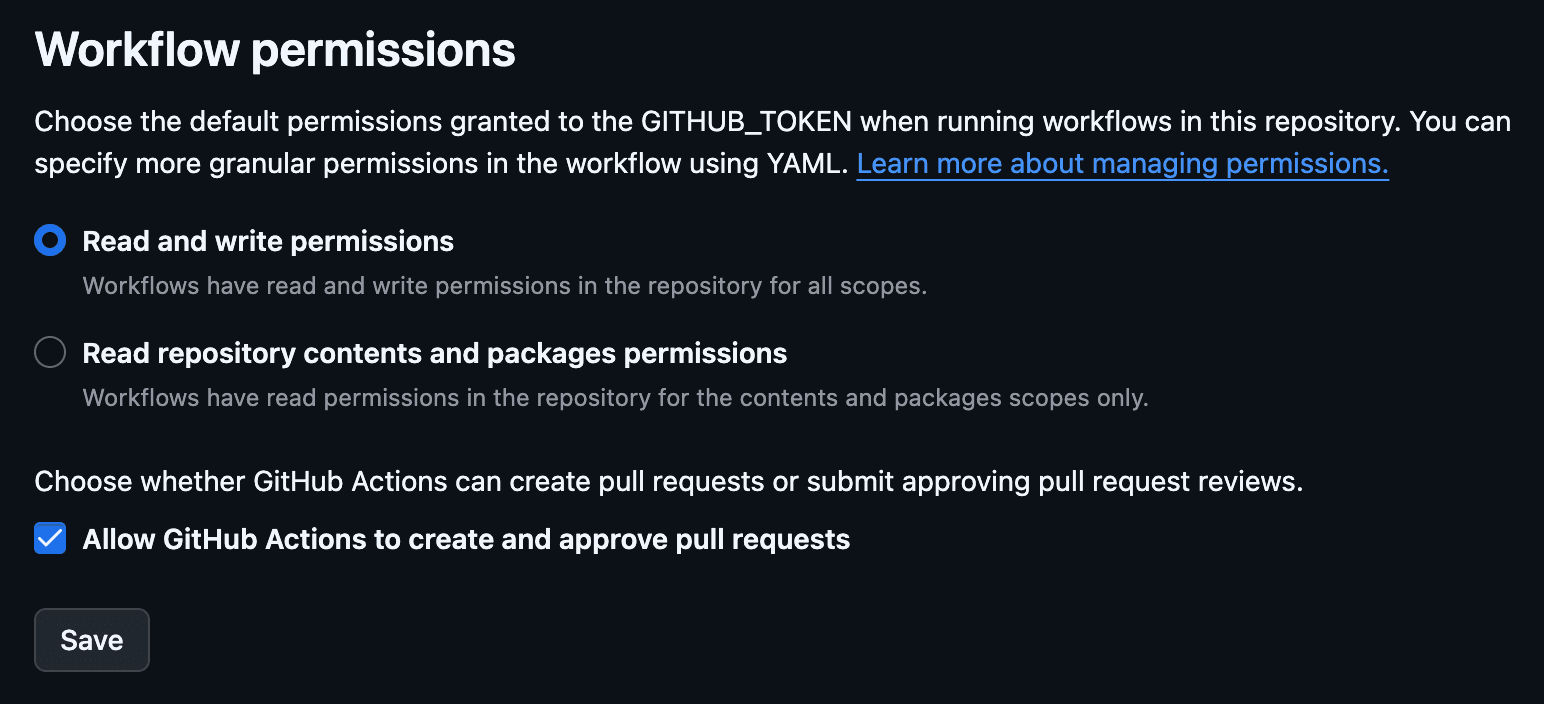
Under Settings → Actions → General → Workflow permissions (the pre-push hook prints a direct link on your first push):
- Select Read and write permissions so workflows can branch, commit the changelog, and tag.
- Check Allow GitHub Actions to create and approve pull requests so the release PR can open.
- Click Save.
On a brand-new empty repo, push canary first (git push origin canary) so GitHub makes it the default branch. The pre-push hook (.github/scripts/ensure-remote-branches.ts) then seeds the release branches (main by default) on your next push (each a separate ref, so they never collide) and the release PR opens on its own. No gh and no repo-admin required.
Land work on canary with squash-merge
Feature PRs merge into canary as a squash: one commit per PR, then delete the branch. This matters because changelogen builds the changelog straight from commit subjects: one clean Conventional Commit per PR yields one clean changelog line, and a branch's messy work-in-progress history never leaks in. The auto-labeler.yml workflow posts this reminder on every PR opened against canary.
The lone exception is the canary → main release PR below, which merges with a merge commit so main keeps shared history with canary instead of diverging.
The release, one merge
A draft PR opens itself
Every push to canary runs auto-canary-into-main.yml, which opens a draft PR (canary → main, titled ci(release): 🚀 merge canary into main) if one isn't already open, and moves the root package.json version forward to what the window has earned so far, as a ci(version) commit on canary. That is why previews show the upcoming number, and why production shows it the moment you merge.
You review and merge with a merge commit
Mark the draft ready, review it, and merge with a merge commit. That merge is what triggers auto-release.yml. When the release PR's head is a commit the workflow pushed (the version bump, most often), GitHub holds its build for approval rather than running it: approve that run under the PR's checks (or gh api -X POST repos/<owner>/<repo>/actions/runs/<id>/approve) and let it pass before you merge. A head you merged yourself builds without the hold.
Changelog, version, and release (automatic)
auto-release.yml checks out canary and:
- generates
CHANGELOG.mdfrom the lastv*tag, - ships the version already in
package.json: what the window earned, or the larger version you hand-set (see Pinning a version), - refreshes the build-graph snapshot at
.github/assets/graph-build.svg, - commits
ci(changelog): update changelog and bump versiondirectly ontocanary, - tags
v<version>and pushes branch and tag atomically, - publishes a GitHub release whose notes mirror the new
CHANGELOG.mdsection.
If the commit range holds only filtered-out types, it skips the release. That is ci, which changelog.config.json turns off, and non-breaking chore(deps), which changelogen drops on its own whatever the config says: title a dependency refresh build(deps) so it earns a line and a version.
The changelog commit lands directly on canary rather than through a second PR because it's mechanical, generated from PR titles you already reviewed. If a run tags the version but fails before publishing, the next run backfills the missing GitHub release.
The CLI rides the same release
This part is the canonical repo's alone: a fork does not take packages/cli or cli-release.yml. The zerostarter npm package has no version of its own (its package.json holds a 0.0.0 placeholder); cli-release.yml stamps one at publish time. What it publishes depends on what started it:
| Trigger | Publishes | npm tag |
|---|---|---|
auto-release.yml succeeds, or a GitHub release is published by hand | the release version, from the tag | latest |
a manual run, gh workflow run cli-release.yml --ref canary | the release version, from the tag | latest |
a push to canary touching packages/cli, packages/scripts or tests | <next version>-canary.<n> | canary |
the repo owner comments /release on a same-repo PR | 0.0.0-<short sha> of that PR | test |
A release and a canary push both run the whole suite on Linux, macOS and Windows before anything is published. The /release comment skips that matrix, since its point is a build you can try in seconds: bunx zerostarter@0.0.0-<short sha> init.
Publishing authenticates through npm Trusted Publishing: npm trusts cli-release.yml in this repository through the job's id-token: write, so there is no npm token in the repo to expire or leak, and every version carries a provenance attestation. The manual run is how a release whose publish leg failed gets to npm; re-running the failed run would replay the workflow file it started with.
Pinning a version
Ordinary releases carry what the window earned: at 0.x a feature is a patch (0.1.0 -> 0.1.1 -> ...) and a breaking commit a minor; past 1.0 the usual semver, all computed by changelogen from the last tag and written into package.json as the window grows. To cut something bigger (a minor like 0.2.0 or a major like 1.0.0), set the version in the root package.json yourself on canary before you merge the release PR. auto-release.yml ships a hand-set version as long as it is ahead of what the window earned; a breaking window lifts a smaller pin to the minor it earns (retargeting the generated changelog section to it), and the window after it moves forward from there.
How it deploys
Both branches deploy through Vercel. Drizzle migrations run at API build time via .github/scripts/migrate-on-deploy.ts, but only when VERCEL_ENV=production or the ref is canary; every other deploy (including PR previews) logs a skip and exits, so an unmerged migration never touches the shared database. Those two builds therefore need a valid POSTGRES_URL.
Next
- Code Quality: the conventional commits and hooks that feed the changelog.
- Deploy to Vercel: where
mainandcanaryactually ship.